Tag Archives: strength

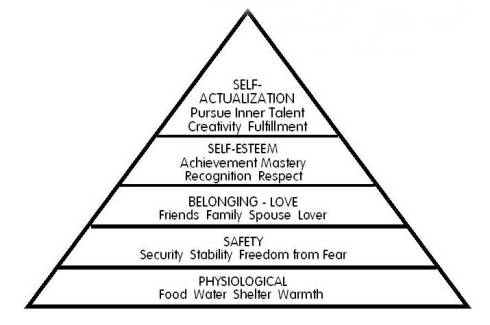
Maslow’s Hierarchy Of Needs

15 Mar


If you know this chart what are your thoughts?

If you don’t, what are your thoughts?

In life there is definitely a natural progression. We all have wants and needs.

I’m curious who disputes this hierarchy.

Get At ME.

#BlogHeavy.


Maslow’s Hierarchy Of Needs.

BLOGGING SERIES UPDATE #2

15 Mar

Updated Blogging Series

Hey folks here we have the complete postings of my latest series on why you need a blog. Every business benefits from a web presence, and as such yours should be brilliant, not lacking or dysfunctional.
I added additional articles from previous posts to aide your transition from novice to blogging machine.

-The Top Reasons Why Your Company Needs a Blog-
part 1
part 2
part 3

-Why you need a Blog and how to blog

Click here

-What You Blog is as important as How You Blog

Click here

-How To Make Money Blogging

Click Here

-SuperTipForBlogging

http://bit.ly/YgvONI


#thriveorsurvive.

Thoughts? Concerns?
Questions? Think I’m wrong?
Let’s chat.
Need ideas?
Want to learn how to invite?
Let’s chat.
Want a mentor or maybe the guy who will bounce ideas back and forth with you?
Let’s chat-
Tony@Changeinadvance.com
@changeinadvance
http://www.changeinadvance.com
Or simply reply to this article.


INFOGRAPHIC: TIME FOR SMALL BUSINESSES TO TAKE MOBILE SERIOUSLY

12 Mar

mobile infographic

#thriveorsurvive.

“Don’t wait. The time will never be just right” –Napoleon Hill

Thoughts? Concerns?
Questions? Think I’m wrong?
Let’s chat.
Need ideas?
Let’s chat.
Want a mentor or maybe the guy who will bounce ideas back and forth with you?
Let’s chat-
Tony@Changeinadvance.com
@changeinadvance

http://changeinadvance.com

Or simply reply to this article.


Image

INFOGRAPHIC: CONTENT MARKETING AND THE POWER OF VIDEO

12 Mar


#thriveorsurvive.

“Don’t wait. The time will never be just right” –Napoleon Hill

Thoughts? Concerns?
Questions? Think I’m wrong?
Let’s chat.
Need ideas?
Let’s chat.
Want a mentor or maybe the guy who will bounce ideas back and forth with you?
Let’s chat-
Tony@Changeinadvance.com
@changeinadvance

http://changeinadvance.com

Or simply reply to this article.

Free Copy for my readers- The Science Of Getting Rich (by Wallace D. Wattles)

26 Feb

wattles

Click the pic to get your copy.

FREE Kindle E-Book: Marketing Metrics: The Definitive Guide to Measuring Marketing WAS $49.99

3 Feb

“>

Tips for raising funding for your Business Online [ infographic ]

31 Jan

Via technology-in-business.net

30 Jan

The scariest moment is always just before you start.

Stephen King

IT’S ONLY CONCEIT IF YOU DIDN’T EARN IT.

29 Jan


IT’S ONLY CONCEIT IF YOU DIDN’T EARN IT..

Quick Tip: Get Widgety

29 Jan

Quick Tip: Get Widgety by Krista on January 29, 2013

WordPress.com widgets are a great way to add new content such as your Twitter stream, or to display del.icio.us links, a tag cloud and/or a calendar to your blog, either in the sidebar, header, or footer of your site.

To see the widgets you have available to you, log in to your WordPress.com dashboard and click on Appearance > Widgets. To add a widget, simply click on it and drag it up and over to the right of the widget screen, into the Default Sidebar, Header Area, or Footer Area section of your site. If you choose to use several widgets in your sidebar, for example, you can click and drag them to order them as you see fit.

Here’s a bunch of my favorite widgets:

•Text: Text widgets allow you to enter some custom text, say for a short “About” statement in your sidebar. Text widgets also accept basic HTML, so you can add headings, paragraph breaks, and links if you wish.
•Image: Just as the name implies, the image widget allows you to add a image to your sidebar.
•Tag Cloud: The tag cloud widget shows your most-used tags in a cloud format. The larger the type size for the tag, the more often it’s used on your site.
•Milestone: The milestone widget puts a countdown box on your site, that tells you how many days are left before the big event — you might use it to countdown to a product launch, to your wedding, your birthday, or a graduation, just to give you a few ideas.
•Goodreads: The Goodreads widget connects to your Goodreads profile and displays the covers of your recently read books.

The five widgets I’ve listed here are just a start — there’s many to choose from, and we’re just getting started. This week, Michael Pick brings us a new piece you’ll love on branding and how you can use image widgets to make your blog’s look unique. Additionally, Cheri Lucas will take us a bit deeper on how to use widgets to add your own personal design flair to your site. In the meantime, take a minute to peek at your widgets and drag a few to your sidebar — it’s never too early to start experimenting.

Design a site like this with WordPress.com
Get started